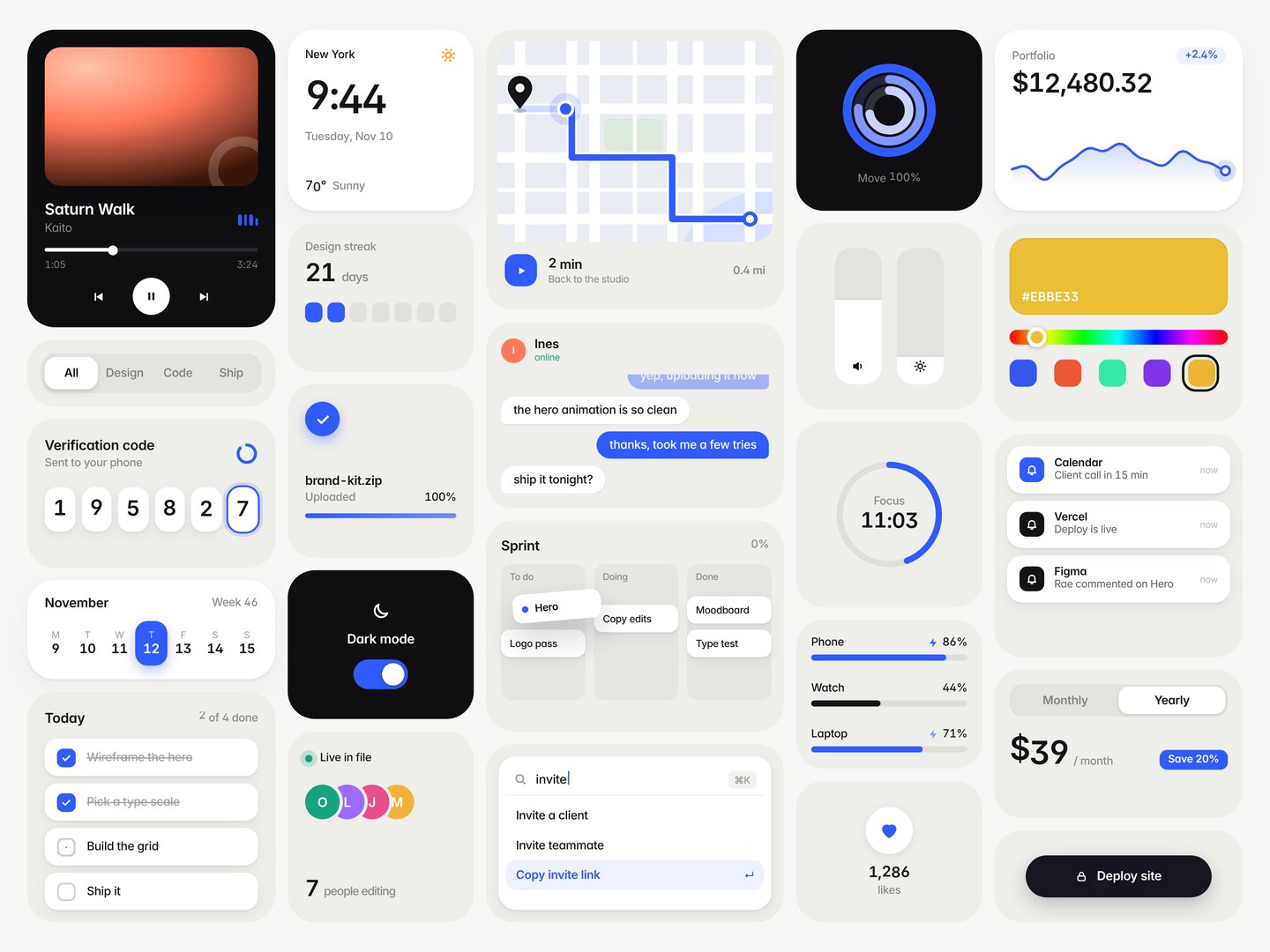
Bento UI motion grid (time-driven HTML, 120 fps)
Style tags: bento-cards, ui-mockup, clean-minimal, light-airy, grotesk-led.
Pick this when: you want the viral "this model can actually design" style post: one static camera on a grid of Dribbble-tier product widgets, everything alive at once, buttery motion, no voiceover, no cuts. Great for showing off design taste, a component library, an app concept or a design system in 24 seconds.
Don't pick it for: - camera pushes through one product flow: pastel-glow-ui-film; - cursor-driven tool tours with stickers: figma-motion-launch; - changelog / release cadence films: linear-releases; - fast hard-cut screenshot collages: fast-collage-recolor-demo.
How it differs from the nearest skills
| bento-ui-motion-grid (this) | pastel-glow-ui-film | figma-motion-launch | fast-collage-recolor-demo | |
|---|---|---|---|---|
| Camera | locked off, never moves | big pushes and pans | cuts + cursor moves | cuts |
| Motion | 24 cards animating at once, each on its own clock | one focus at a time | cursor-led | screenshot swaps |
| Cuts | none (intro springs in, then continuous) | scene windows | cuts | many |
| Format | 1440x1080, 120 fps master, 60 fps cut, 24 s, silent | 1920x1080, 50 fps | 1920x1080 | landscape |
| Tech | single index.html, pure draw(t) |
Remotion | DOM/canvas | DOM |
Visual spec (template defaults)
- Stage: 1024x768 CSS px, captured at device scale 2.8125 (2880x2160) and downscaled with Lanczos to 1440x1080. Crisp type.
- Palette: bg #F7F7F5, tray #EEEEEA, white cards with two-layer soft shadow, dark cards #0F0F12, ink #141416, muted #8B8B87, ONE accent (#2F5BFF signal blue) plus its tint #EEF2FF. Change the accent in
:rootandconst A. - Type: Inter with
tnum,cv11,ss01; 9 to 11 px labels, 16 to 36 px numerals, tracking slightly negative. - Grid: 5 columns (x 22, 232, 392, 642, 802; widths 200, 150, 240, 150, 200), 10 px gaps, tray radius 22, inner card radius 14. Every column sums to 720 px of height.
- Timeline: 0 to ~1.6 s staggered spring intro (scale 0.86 to 1, opacity, content rises 6 px, delay by x and y). Then each card runs its own cycle (period 2.2 to 7.5 s, offsets spread 1.2 to 4.5 s) plus ambient motion (eq bars, sparkline scroll, car on route, timer, typing dots, pulse rings) so something is always moving.
Architecture (template/)
index.html            everything: CSS tokens, easing + timing helpers, roll() odometer digits, 24 widget functions W.<name>(t),
                      the layout table L = [[id, x, y, w, h, 'w'|'d'|''], ...] and draw(t) which re-renders the whole page for time t.
scripts/render.py     parallel Playwright workers; frame i -> draw(i/fps) -> screenshot 2.8125x -> 1440x1080 PNG. --fps --seconds --workers
scripts/snap.py       stills at chosen seconds into out/ (fast review loop)
scripts/smoothness.py per-card frame-diff spike detector (finds snaps and cycle-wrap jumps)
scripts/encode.sh     frames -> out/grid_120.mp4 (120 fps master) + out/grid_60.mp4 (every 2nd frame, for X), ffprobe check
Timing helpers (the whole motion language)
spring(p): damped spring FROM REST (zeta 0.55, ~12% overshoot), normalised so p=1 is exactly 1. Use for anything that travels: knobs, gliders, rings, digits, cards.soft(p): critically damped, no overshoot, zero start velocity. Use for crossfades, colour/theme flips, stack pushes, resets.expo(p): ease-out-expo. Use only for opacity reveals; it starts fast, so never for big colour areas.io(p): quintic in-out for long travel (map car).st(t,P,o)->{k,l,pre}cycle index and seconds-into-cycle;st2andtw(t,P,o,vals,dur,ease)tween value lists with the first change ato;rollV(...)rolls formatted numbers between list values.roll(from,to,l,dur,stagger): per-digit odometer columns (tabular digits) with left-to-right stagger; non-digits crossfade.
Quick start
cp -r skills/bento-ui-motion-grid/template my-grid && cd my-grid      # never build inside the skill folder
pip install playwright pillow numpy && python3 -m playwright install chromium   # or pass --chrome /usr/bin/google-chrome
python3 scripts/snap.py 0.6 3 7.5 12                                  # look at the intro and a few mid states
python3 scripts/render.py --fps 120 --seconds 24                      # 2880 frames, ~4 min on 6 workers / 8 cores
python3 scripts/smoothness.py frames                                  # expect BIG SPIKES near 0; inspect any that remain
bash scripts/encode.sh frames out                                     # out/grid_120.mp4 + out/grid_60.mp4
Recipe
- Concept first. Pick a fictional product or a mixed "design system" set and ONE accent colour. Do not copy a reference app's widgets; vary the widget types (media, time, money, map, chat, tasks, controls, status).
- Layout. Edit
L. Keep 5 columns that each sum to 720 px; mix tall (180 to 240), medium (120 to 160) and thin (54 to 80) trays; 2 or 3 dark cards; 3 or 4 white trays; the rest tray grey with white inner cards. - Widgets. Each
W.name(t)returns HTML for time t. Pure function of t: noMath.random, no Date, no CSS transitions/animations. Reuse the helpers above. - Make every state change continuous. For each widget check the cycle wrap (end state at l=P must equal start state at l=0 of the next cycle) and the pre-start state (t < offset). Fade out then fade in rather than popping.
- Review stills with
snap.py, then render, then runsmoothness.py. Fix any card with big spikes, re-render, re-check. - Encode with
encode.sh. Post the 60 fps file to X (X plays at most 60 fps); keep the 120 fps master.
Gotchas (all hit while building the reference)
- Springs that start with velocity (
1 - e^-at cos bt) look like a jerk on frame 1 at 120 fps. Use the from-rest spring. - Binary swaps hide in plain sight: a heart icon that switches fill at p>0.5, a label that swaps text, a progress fill removed when a state ends. Layer both states and crossfade opacity.
expoon a large colour area (album art, theme flip) reads as a flash. Usesoft.- Values that wrap (
(t*k) % x) jump; use monotonic values over the 24 s. - Two widgets sharing a value (ring and its % label) must use the same cycle indexing (
stvsst2differ by one). - Digit-width changes (9% -> 10%) show as a tiny spike in the checker; that is fine.
.rc b{display:block}must match nested spans, or the odometer prints 0123456789 inline.- SVG map: match the viewBox aspect to the box or
slicecrops your route ends.
Known limits
- Silent by design. Content is fictional sample data; brand marks are generic squares.
- Rendering is CPU bound (~0.5 s per 2880x2160 frame per worker). 120 fps x 24 s = 2880 frames.
- Text sizes are tuned for 1440x1080 viewing on a phone; for 1080x1920 vertical, rebuild
Lrather than scaling.
Verified
- Date: 2026-11-10
- Reference render:
remake_120.mp4(1440x1080, 120/1, 2880 frames, 24.0 s) andremake_60.mp4(60/1, 1440 frames), both H.264 yuv420p, silent. - Smoothness: after the fixes above, every card had 0 big spikes except digit-width changes (deploy % counter) and moderate spikes from intentional pops (crew avatars, chat bubbles, notifications).
- Template smoke test: copied out of the skill folder,
render.py --fps 30 --seconds 2 --workers 2,smoothness.py,snap.py,encode.shall ran clean with no page errors.